Creating Image Rollovers in CSS
Image rollovers can be an interesting and elegant way to navigate your users through your site. Having graphical images that come into focus on the mouse over, can also be a great way to add more flair and interaction.
This tutorial will show you a quick and easy way, to add a simple, CSS, image rollover, in two easy steps.
In the first step we will need to add two images. The first will be your button and the second should be the button hover state. This would look something like this, in your HTML code:
    <img alt="Rollover Images" src="/images/sampledata/button1.png" />
    <img alt="Rollover Images" src="/images/sampledata/button1_hover.png" />
The next step will be to wrap an img_rollover div style around the two images which will give you the rollover effect.
<div class="img_rollover">
    <img alt="Rollover Images" src="/images/sampledata/button1.png" />
    <img alt="Rollover Images" src="/images/sampledata/button1_hover.png" />
</div>
Which would give you this, when outputted, in the editor's WYSIWYG view.

1. Add rollover images
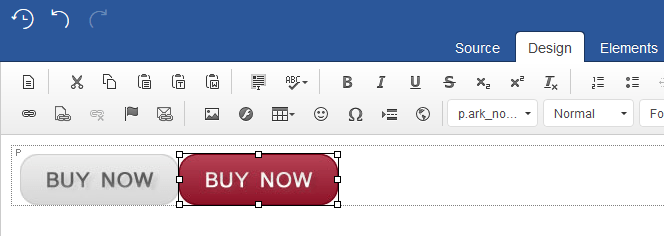
To do this, simply insert your two rollover images back to back, in the editing area as seen below:
2. Add image rollover style
First highlight both images, with the left mouse click as see in point (1.) below and click on the editor’s ' div ' button as seen in point (2.) which will load up the 'Create Div Container' window. Next select the: ' div.img_rollover ' style as seen in point (3.), lastly click on 'OK' and - job done!
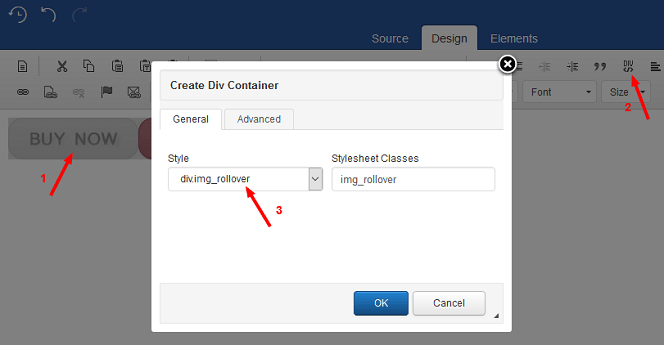
This will wrap the images in a div container which will allow us to call the first and last image (in CSS), in creating the desired rollover effect.