Chapter 5: Versioning [Step 2: Adding a version method]

Chapter 5: Versioning [Step 2: Adding a version method]

In this part, we are going to add a method to our two classes: ARKContextsMyCCKCategory and ARKContextsMyCCKItem we created in the Read and Update section of this tutorial. You will need to do the same for the classes you created specifically for your component.

So, in the ARKContextsMyCCKCategory class for our component, we will add the version method with the code implementation as follows:

public function version($versionId,$type)
{
			
	$historyTable = JTable::getInstance('Contenthistory');
	$historyTable->load($versionId);
	$rowArray = JArrayHelper::fromObject(json_decode($historyTable->version_data));
		
	$item = $this->table;

	$item->bind($rowArray);	
	if($type == 'title')
	{
		return array( 'data'=>$item->title);
	}
	$text = '';
	
	$text = $item->description;

	return array( 'data'=>$text);
}

The version function takes two parameters:

Parameter

Description

Version

Unique ID in History table for the  historic record in the database

Type

Unique type alias used for  Joomla content type


The parameters values are supplied by Joomla’s Version Manager when the end user selects a version to revert to from the current content of the editor.


As you see in this method, this is standard Joomla stuff. We simply load up a JTable instance of the history table, and then retrieve the specified record using the unique Version ID. Once we attain the database record, we return the historically stored text to the editor to update the current text.


Now, zip all your files, basically, zip up the root folder that contains your files and folders you created. So, you will create a zip file like [FILES_INLINE + COMPONENT NAME].zip such as files_inlinemyck.zip in our case.

Okay, now, we will create a Joomla package file, so that we can easily install and manage our inline editing app using Joomla’s Extension Manager.

Joomla package zipped file should contain the following:

public function version($versionId,$type)
{
			
	$historyTable = JTable::getInstance('Contenthistory');
	$historyTable->load($versionId);
	$rowArray = JArrayHelper::fromObject(json_decode($historyTable->version_data));
		
	$item = $this->table;

	$item->bind($rowArray);	
	if($type == 'title')
	{
		return array( 'data'=>$item->title);
	}
	$text = '';


	$text = $item->introtext;
	if (!empty($item->fulltext))
	{
		$text .= '<hr id="system-readmore" />' . $item->fulltext;
	}


	return array( 'data'=>$text);
	
}

So, that is it for this section.

Well, some of you may be asking: What about the ARKContextsMyCCKBlog class. I have not missed it because it does not need updating as it extends ARKContextsMyCCKItem class, so, it will inherit the version method from that class.


Also, some of you may have noticed: I haven’t talked about the textarea extra field. Well, we are going to cover that in the Adding Extra fields section.

Read more: Chapter 5: Versioning [Step 2: Adding a version method]

  • Hits: 59

Chapter 5: Versioning [Step 1: Update XML with versioning section]

Chapter 5: Versioning [Step 1: Update XML with versioning section]

The first step is to add a versioning section to our XML manifest file at the bottom in the arkeditor section.

To explain this further, let us look at a live example by looking at what we did for our MyCCK extension.

<versioning>
	<versions>
		<version>
			<dbtable>#__mycck_items</dbtable>
			<type>item</type>
			<prefix>MyCCKTable</prefix>	
			<formFile>administrator/components/com_flexicontent/models/forms/item.xml</formFile>
			<fields>
				<field>id</field>
				<field>title</field>
				<field>introtext</field>
				<field>fulltext</field>
			</fields>
		</version>
		<version type="textarea">
			<dbtable>#__mycck_fields</dbtable>
			<type>fields</type>
			<prefix>MyCCKTable</prefix>	
			<formFile>administrator/components/com_flexicontent/models/forms/field.xml</formFile>
			<fields>
				<field>id</field>
				<field>name</field>
				<field>description</field>
			</fields>
		</version>
	</versions>
	<catdbtable>#__mycck_categories</catdbtable>
	<cattype>category</cattype>
	<catprefix>MyCKKTable</catprefix>	
	<catformFile>administrator/components/com_flexicontent/models/forms/category.xml</catformFile>
	<catfields>
		<field>id</field>
		<field>title</field>
		<field>description</field>
	</catfields>
</versioning>

Our component uses three tables to store data for our component:

We have an item table, a category table and a fields table for extra fields we may want for our article.

In the above XML segment, we add the structural details of the tables to explain to Joomla how to deal with storing and retrieving information from its history table for our components table.

In our example, you can see in the XML the versions section is used to store the structural information of our item table, where each version element is used to represent each table we want versioned.

The category table, as you can see in this example is stored outside of the versions element because there will only be one category table.

Okay, now let’s go through the required information we need to store for each table that we want versioned by Joomla:

XML Element

Requirement

Description

Dbtable

Mandatory

The name of the database table to be versioned by Joomla.

Type

Mandatory

The file name of your JTable file.

Prefix

Mandatory

Prefix used for your Jtable class.

Please note: that this element value can be left empty, but it must be present.

formFile

Optional

Used to label the fields used by Joomla from the fields you specified in the fields element.

This element and can be omitted as is not mandatory and is only used for cosmetic purposes.

Fields

Mandatory

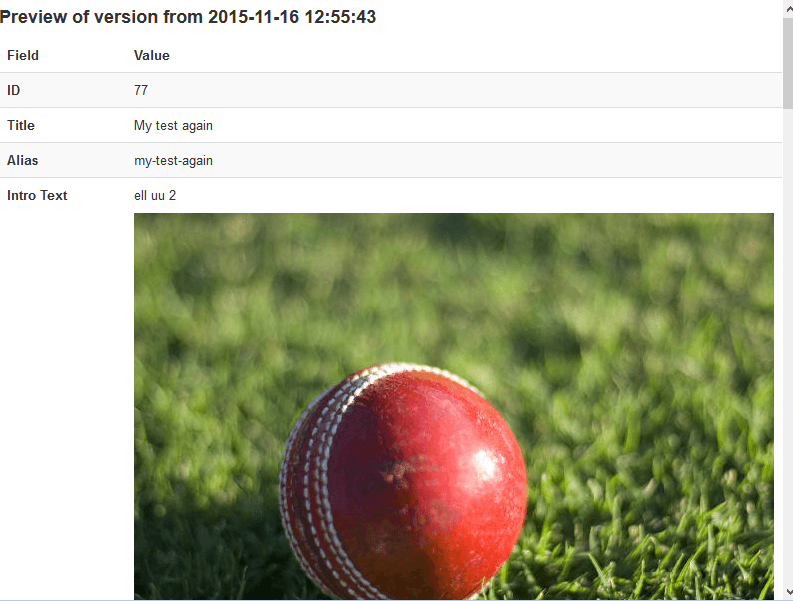
This element will contain a list of field elements where each one contains the name of the database table field name you want Joomla to display in the version manager preview screen. Please see image below


The details above will be enclosed in a version tag for each table you want to add versioning for your component. The version tag has an optional attribute called type. If you supply a value for this attribute, the system will use that to generate a unique name for the alias for your content type: <component name>.<JTable type>.<type attribute name> .

Please note: You need to supply the type attribute to be used for the type alias for every additional table you want to be versioned. The value of the type attribute must be the same as an actual type you are using in your component, i.e. the type attribute values must be one defined in the types section of the XML manifest.

The entry without any type attribute, usually the first one, will be considered to be the main item table for your component and your component’s context will be used for creating the content type alias e.g. this will be ‘mycck’ for our component.

Joomla Version Manager preview screen

Similar if you have a category table that you want versioning as well, you will add the following details after the versions element in the versioning tag:


XML Element

Requirement

Description

catdbtable

Optional

The name of the database table to be versioned by Joomla

cattype

Mandatory only if catdbtable element is present

The file name of your JTable file.

catprefix

Mandatory only if catdtype element is present

Prefix used for your Jtable class.

Please note that this element value can be left empty, but it must be present.

catformFile

Optional

Used to label the fields used by Joomla from the fields you specified in the fields element.

This element and can be omitted as is not mandatory and  is only used for cosmetic purposes.

catfields

Mandatory only if catprefix element is present

This element will contain a list of field elements where each one contains the name of the database table field name you want Joomla to display in the version manager preview screen. Please see image below


So putting this all together and looking at our example for the MyCCK component, your XML manifest file should look something like the following:

<?xml version="1.0" encoding="utf-8"?>
<extension version="3.2" type="file" method="upgrade">
	<name>files_inlinezoo</name>
	<author>WebxSolution Ltd</author>
	<creationDate>March 2015</creationDate>
	<copyright>>Copyright (C) 2015 All rights reserved</copyright>
	<license>GNU General Public License version 2</license>
	<authorEmail>This email address is being protected from spambots. You need JavaScript enabled to view it.</authorEmail>
	<authorUrl>http://www.arkextensions.com</authorUrl>
	<version>1.0</version>
	<description>This plugin provides an extension for ARK inline editing to add support for ZOO CCK</description>
	
	
	<!-- set up data for  inline lookup table     //-->

	<arkeditor>	
		<extensionName>com_zoo</extensionName>
		<!-- allowable views for inline editing //-->
		<views>
			<view>item</view>
			<view>category</view>
		</views>
		
		<!-- add context element if context is different to extension Name //-->
	
		<!-- extension types to be used for inline editing //-->
		<types>
			<type>category</type>
			<type>item</type>
			<type>blog</type>
		</types>
		
		<!-- details for Joomla versioning system //-->
		
		<versioning>
			<versions>
				<version>
					<dbtable>#__items</dbtable>
					<type>item</type>
					<prefix>MyCCKTable</prefix>	
					<formFile>administrator/components/com_flexicontent/models/forms/item.xml</formFile>
					<fields>
						<field>id</field>
						<field>title</field>
						<field>introtext</field>
						<field>fulltext</field>
					</fields>
				</version>
				<version type="textarea">
					<dbtable>#__fields</dbtable>
					<type>fields</type>
					<prefix>MyCCKTable</prefix>	
					<formFile>administrator/components/com_flexicontent/models/forms/field.xml</formFile>
					<fields>
						<field>id</field>
						<field>name</field>
						<field>description</field>
					</fields>
				</version>
			</versions>
			<catdbtable>#__categories</catdbtable>
			<cattype>category</cattype>
			<catprefix>MyCKKTable</catprefix>	
			<catformFile>administrator/components/com_flexicontent/models/forms/category.xml</catformFile>
			<catfields>
				<field>id</field>
				<field>title</field>
				<field>description</field>
			</catfields>
		</versioning>
		
	</arkeditor>
	
	<fileset>
		
		<!-- location for MyCCK main inline editing extension type file //--> 
	
		<files folder="extensions" target="plugins/content/arkcontent/extensions">
			<file>mycck.php</file>
		</files>
	
		<!-- location for context types for MyCCK  inline editing extension //-->
	
		<files folder="contexts/mycck" target="plugins/ajax/inlinecontent/contexts/mycck">
			<file>category.php</file>
			<file>item.php</file>
			<file>blog.php</file>
		</files>
		
	</fileset>
	
</extension>

That is for part 1, now let us go onto part 2.

Read more: Chapter 5: Versioning [Step 1: Update XML with versioning section]

  • Hits: 28

Chapter 4: XML Installation Manifest File

Chapter 4: XML Installation Manifest File

The mainfest file we will be creating will basically be the same as a standard one for installing files i.e. the extension type will be ‘file’.  But in our case we have modified the template by adding an arkeditor section so the installing knows it is installing an inline editing app.

So, the arkeditor section for our MyCCK inline editing app so far looks like this:

<arkeditor>	
	<extensionName> com_mycck </extensionName>
	<!-- allowable views for inline editing //-->
	<views>
		<view>item</view>
		<view>category</view>
	</views>
		
	<!-- add context element if context is different to extension Name //-->
	
	<!-- extension types to be used for inline editing //-->
	<types>
		<type>category</type>
		<type>item</type>
		<type>blog</type>
	</types>
</arkeditor> 

The whole file will be as follows:

<?xml version="1.0" encoding="utf-8"?>
<extension version="3.2" type="file" method="upgrade">
	<name>files_mycck</name>
	<author>WebxSolution Ltd</author>
	<creationDate>March 2015</creationDate>
	<copyright>>Copyright (C) 2015 All rights reserved</copyright>
	<license>GNU General Public License version 2</license>
	<authorEmail>This email address is being protected from spambots. You need JavaScript enabled to view it.</authorEmail>
	<authorUrl>http://www.arkextensions.com</authorUrl>
	<version>1.0</version>
	<description>This plugin provides an extension for ARK inline editing to add support for MyCCK</description>
	
	
	<!-- set up data for  inline lookup table     //-->

	<arkeditor>	
		<extensionName>com_mycck</extensionName>
		<!-- allowable views for inline editing //-->
		<views>
			<view>item</view>
			<view>category</view>
		</views>
		
		<!-- add context element if context is different to extension Name //-->
	
		<!-- extension types to be used for inline editing //-->
		<types>
			<type>category</type>
			<type>item</type>
			<type>blog</type>
		</types>
		
		<!-- details for Joomla versioning system //-->
	
	</arkeditor>
	
	<fileset>
		
		<!-- location for MyCCK main inline editing extension type file //--> 
	
		<files folder="extensions" target="plugins/content/arkcontent/extensions">
			<file>mycck.php</file>
		</files>
	
		<!-- location for context types for MyCCK  inline editing extension //-->
	
		<files folder="contexts/mycck" target="plugins/ajax/inlinecontent/contexts/mycck">
			<file>category.php</file>
			<file>item.php</file>
			<file>blog.php</file>
		</files>
		
	</fileset>
	
</extension>

So here you can see we have added two sections for installing our files: One for installing the mycck.php file that handles creating our editable regions for our inline editable types and the other for installing our files for our types of our components, that handle the read/save functionality for inline editing these types.

So looking at another example, if we were to create an inline app for Joomla’s stock Article Manager, the XML file would probably look like this:

<?xml version="1.0" encoding="utf-8"?>
<extension version="3.2" type="file" method="upgrade">
	<name>files_content</name>
	<author>WebxSolution Ltd</author>
	<creationDate>March 2015</creationDate>
	<copyright>>Copyright (C) 2015 All rights reserved</copyright>
	<license>GNU General Public License version 2</license>
	<authorEmail>This email address is being protected from spambots. You need JavaScript enabled to view it.</authorEmail>
	<authorUrl>http://www.arkextensions.com</authorUrl>
	<version>1.0</version>
	<description>This plugin provides an extension for ARK inline editing to add support for Joomla’s Article Manager</description>
	
	
	<!-- set up data for  inline lookup table     //-->

	<arkeditor>	
		<extensionName>com_content</extensionName>
		<!-- allowable views for inline editing //-->
		<views>
			<view>item</view>
			<view>category</view>
			<view>featured</view>
		</views>
		
		<!-- add context element if context is different to extension Name //-->
	
		<!-- extension types to be used for inline editing //-->
		<types>
			<type>category</type>
			<type> article </type>
			<type>blog</type>
			<type>featured</type>
		</types>
		
		<!-- details for Joomla versioning system //-->
	
	</arkeditor>
	
	<fileset>
		
		<!-- location for Article Manager main inline editing extension type file //--> 
	
		<files folder="extensions" target="plugins/content/arkcontent/extensions">
			<file>content.php</file>
		</files>
	
		<!-- location for context types for MyCCK  inline editing extension //-->
	
		<files folder="contexts/content" target="plugins/ajax/inlinecontent/contexts/content">
			<file>category.php</file>
			<file>article.php</file>
			<file>blog.php</file>
			<file>featured.php</file>
		</files>
		
	</fileset>
	
</extension>


Read more: Chapter 4: XML Installation Manifest File

  • Hits: 24

Chapter 5: Versioning

Chapter 5: Versioning

This topic although an import one, we thought we would leave till after you understood the basics of adding inline editing support for your editable types in your component.

This section is optional and so can be skipped. However, we strongly recommend that you implement version control to inline editing for your component. Users can easily make mistakes, and especially if the autosave feature is enabled, we believe this is an essential function to have to keep your users happy.

Note: That your component must be using JTable because we will be using Joomla’s versioning system.

Firstly, we must update Joomla’s version system, to inform it that we want to extend its system and to start storing your component’s various states in Joomla’s history table.

To do this will require a two step approach.

Read more: Chapter 5: Versioning

  • Hits: 26

Chapter 3: Blog type [Save Method]

Chapter 3: Blog type [Save Method]

Saving the actual data is the same as in the Item type class. However, when we are returning the data, just as in the trigger ContentPlugins method when we are dealing with the HTML content, we only return the introduction text.

Also, we change this line of code:

$dispatcher->trigger('onContentPrepare', array ('com_mycck.item', &$item, &$item->params, 0));

To

$dispatcher->trigger('onContentPrepare', array ('com_mycck.category', &$item, &$item->params, 0));

Please take note: that how we deal with the introduction text and the main text for our items in our component, maybe different to how you deal with it in yours. You may use some string truncation function and if that is the case, you will need to use that method instead.

Read more: Chapter 3: Blog type [Save Method]

  • Hits: 24